You do not need technical words to get started. Describe what is difficult and what you want to make easier. You can send a short inquiry without an account.
Have a complex or technical project?Describe it here. The listed packages are starting points. Larger spreadsheets are welcome; feasibility, size and complexity are reviewed before agreeing a custom scope and price.
What do the file types and technical terms mean?
PDF
A document you can read in a browser or PDF reader.
XLSX
An Excel workbook. Open it in a spreadsheet app to inspect the full example.
CSV
A plain spreadsheet file. Open it in a spreadsheet app to see rows and columns.
TXT
A plain-text checklist or template. Open it in a text editor or copy its text.
SOP or procedure
Step-by-step instructions for a task.
CRM
An app used to organize customer or contact records.
Workflow
The steps that move a task from start to finish.
To download a file, select its download link. It may open in your browser or appear in Downloads. If the browser asks, choose where to save it. A download is not a project order.
2,000 real records · Before & after
What does a spreadsheet cleanup actually change?
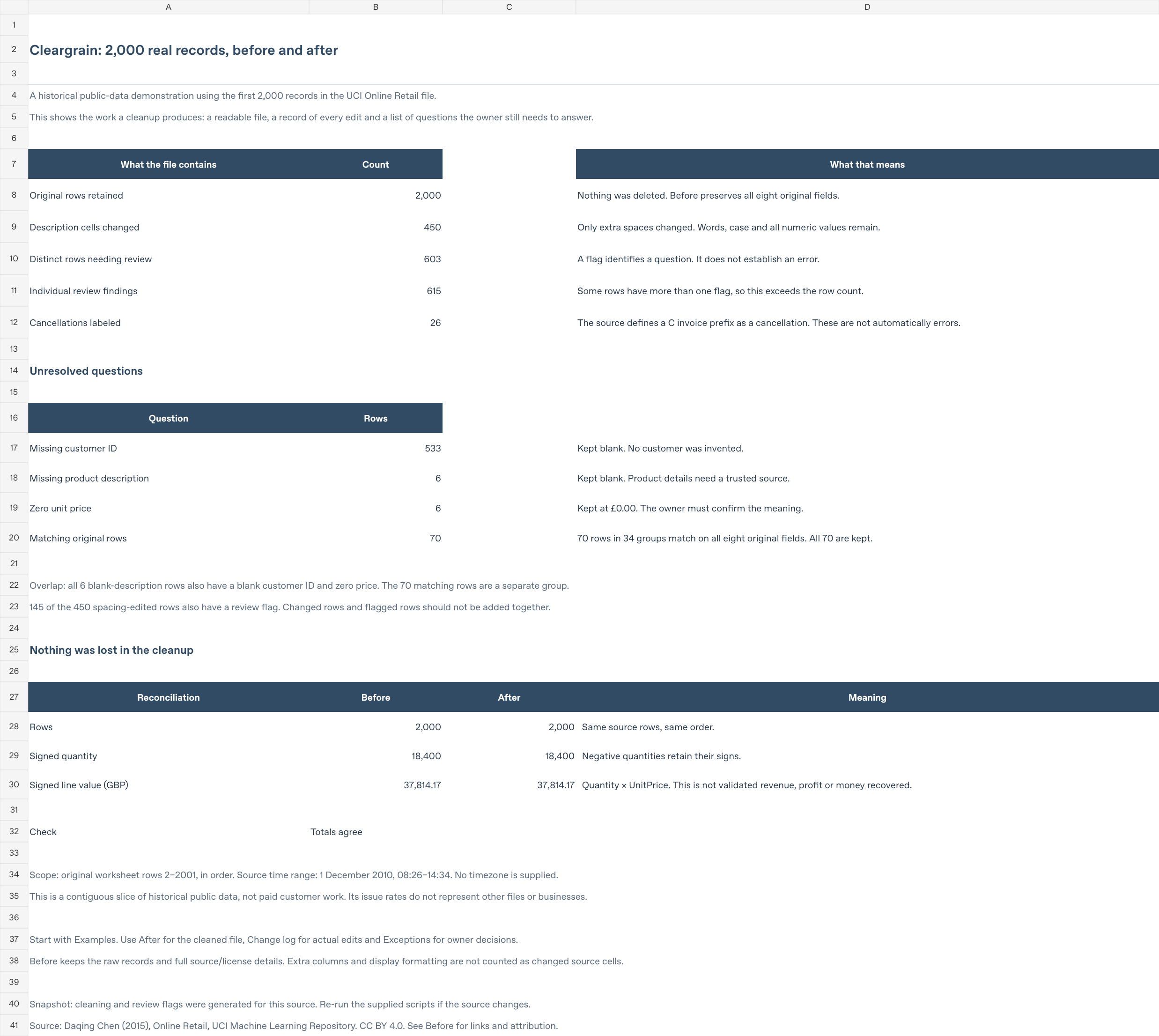
We removed extra spaces from 450 descriptions, added clear labels and line totals, and marked 603 rows for someone to check. All 2,000 records remain, with the same quantities and prices.
Real UK retail records from 1 December 2010 · Not paid client work · Source credited below
2,000records before and after
450descriptions with extra spaces removed
603rows with questions to check
0rows deleted or amounts rewritten
The groups overlap: 145 rows have both a spacing change and a question to check. Cancellation labels are shown separately; a cancellation is not counted as an error.
Three things the cleaned file makes clearer.
1. Spacing edits: remove extra spaces when the formatting is clear. The first two examples below show actual edits to product names.
2. Helpful labels and calculations: make cancellations easier to recognize and show each line’s amount. The original quantity and price stay the same.
3. Questions for the owner: point out missing details or entries that need context. Their values are kept, not guessed or “fixed.”
In this example, the direct edits to the original information are spacing changes. The added labels, calculations and questions make the file easier to review.
Five examples, explained
See the original, the result and the reason.
Each card compares the same fields before and after. “Source row” tells you where to find the record in the original worksheet. “[blank]” means the source cell was empty.
A formatting change · Source row 156
Removed one extra space.
The product name looked normal, but two of its words had an extra gap between them.
Before · in the original file
SET OF 3 COLOUREDFLYING DUCKS
There are two spaces between COLOURED and FLYING.
After · in the cleaned file
SET OF 3 COLOURED FLYING DUCKS
There is now one space between those words.
What changed: Two spaces became one. The words and their meaning stayed the same.
Why it helps: Consistent spacing helps avoid treating otherwise identical product names as different when matching or grouping them.
A formatting change · Source row 12
Removed a hidden space at the end.
A space after the last word can make two names that look the same compare differently.
Before · in the original file
POPPY'S PLAYHOUSE BEDROOM
An extra space sits after BEDROOM, even though it is hard to see.
After · in the cleaned file
POPPY'S PLAYHOUSE BEDROOM
The name ends immediately after BEDROOM.
What changed: Removed the space after BEDROOM. No letters or words changed.
Why it helps: The cleaned name can be compared without that invisible difference getting in the way.
Original values kept · Source row 624
Made missing information easy to find.
This row has no product name or customer number, and its price is zero.
Before · in the original file
Product name
[blank]
Customer number
[blank]
Price per item
£0.00
After · in the cleaned file
Product name
[blank]
Customer number
[blank]
Price per item
£0.00
What we added: A question beside the row: “Check the missing name and customer number, and confirm why the price is zero.” The blank cells and £0.00 were not filled in or changed.
Why it helps: The person checking the file can find this row without scanning the whole sheet.
Still needs the owner’s answer: What should the missing details be, and is the zero price correct?
Original values kept · Source row 143
Made a cancellation easier to spot.
The invoice starts with C and the quantity is −1. Those signs matter when reading the file.
Before · in the original file
Product name
Discount
Invoice number
C536379
Quantity
−1
Price per item
£27.50
After · in the cleaned file
Product name
Discount
Invoice number
C536379
Quantity
−1
Price per item
£27.50
What we added: A “Cancellation” label and a calculated line amount of −£27.50. The original description, invoice, quantity and price are unchanged.
Why it helps: The cancellation is easier to recognize and consider separately when preparing a report.
Still needs the owner’s answer: The source identifies C-prefixed invoices as cancellations. Decide how those entries should be included in the report you need; this example does not decide that for you.
Original values kept · Source row 491 & 529
Marked two identical entries for checking.
Both rows contain the same details. The file does not tell us whether one entry was accidental.
Before · in the original file
HAND WARMER SCOTTY DOG DESIGN
Invoice 536409
Row 491: 1 item at £2.10
Row 529: 1 item at £2.10
After · in the cleaned file
HAND WARMER SCOTTY DOG DESIGN
Invoice 536409
Row 491: 1 item at £2.10
Row 529: 1 item at £2.10
What we added: A question linking the rows: “These entries match. Confirm whether both belong here.” Both rows remain in the cleaned file.
Why it helps: Possible repeats are easy to find, and a valid entry is not deleted by mistake.
Still needs the owner’s answer: Do both entries belong, or should one be removed after checking the original records?
Check that nothing went missing
The totals still match.
We compare the file before and after so a formatting cleanup does not quietly lose rows or change amounts.
All 2,000 selected records
What we counted
Before
After
Number of rows
2,000
2,000
Quantities added together, including negatives
18,400
18,400
Quantity × price for each row, then added together
£37,814.17
£37,814.17
Matching totals are a check on the cleanup, not proof that the business records are correct. The amount includes negative entries exactly as supplied. It is not a verified sales, profit or loss figure.
What the owner still decides
A question is not a correction.
The workbook lists 615 things to check across 603 rows. One row can have several questions, such as a missing description, a missing customer number or an unexplained zero price.
Possible repeat entries are kept. Cancellations keep their minus signs. No quantities, prices or original dates are changed, and missing values are not invented. The selected original records stay available alongside the cleaned view.
Where these records came from
The first 2,000 data records in the original file, worksheet rows 2–2001. They run from 08:26 to 14:34 on 1 December 2010. They were taken in order, without picking rows for their problems. This is not a random or representative sample.
The source is the public UCI Online Retail dataset, which contains 541,909 records from a UK retailer in 2010–2011. No artificial mistakes were added. This excerpt does not establish error rates or business results for the whole retailer.
Have a bigger file?
This example shows a 2,000-row cleanup. Larger spreadsheets are welcome and quoted by size and complexity. The 2,000-row allowance defines the $125 starter pilot, not the size of projects you can ask about.
The whole example is included
Open every original and cleaned record.
Overview explains the result. Examples shows specific changes in plain English. Before contains all 2,000 original records; After contains the same records with spacing edits and extra review columns. Change log lists the 450 edited descriptions. Exceptions lists the questions still needing an answer.
Start with the workbook’s explanation sheet, then compare the original and cleaned records using their source-row numbers.
Excel workbook · 424 KB · Free public demonstration. Open it in a spreadsheet app. The original records and totals were independently checked; native Microsoft Excel testing has not been performed.
Cleargrain Docs selected 2,000 records, removed extra spaces from descriptions and added calculations, labels, review questions and presentation. The workbook keeps the original information. This is historical public data, not a paid-client engagement or an endorsement by the source, its creator or the retailer.
Examples made with invented data are clearly labeled fictional.
Select a file link to open or download it. Check your browser’s downloads list or your device’s Downloads folder.
PDF: read it in your browser. XLSX or CSV: open it in a spreadsheet app. TXT: open it as plain text. You can read the example on this page without downloading anything.
 Spreadsheets · Instructions · Research