 Clear scope. Careful checks.
Website example · Cleargrain Docs
A service website built to make the next step clear.
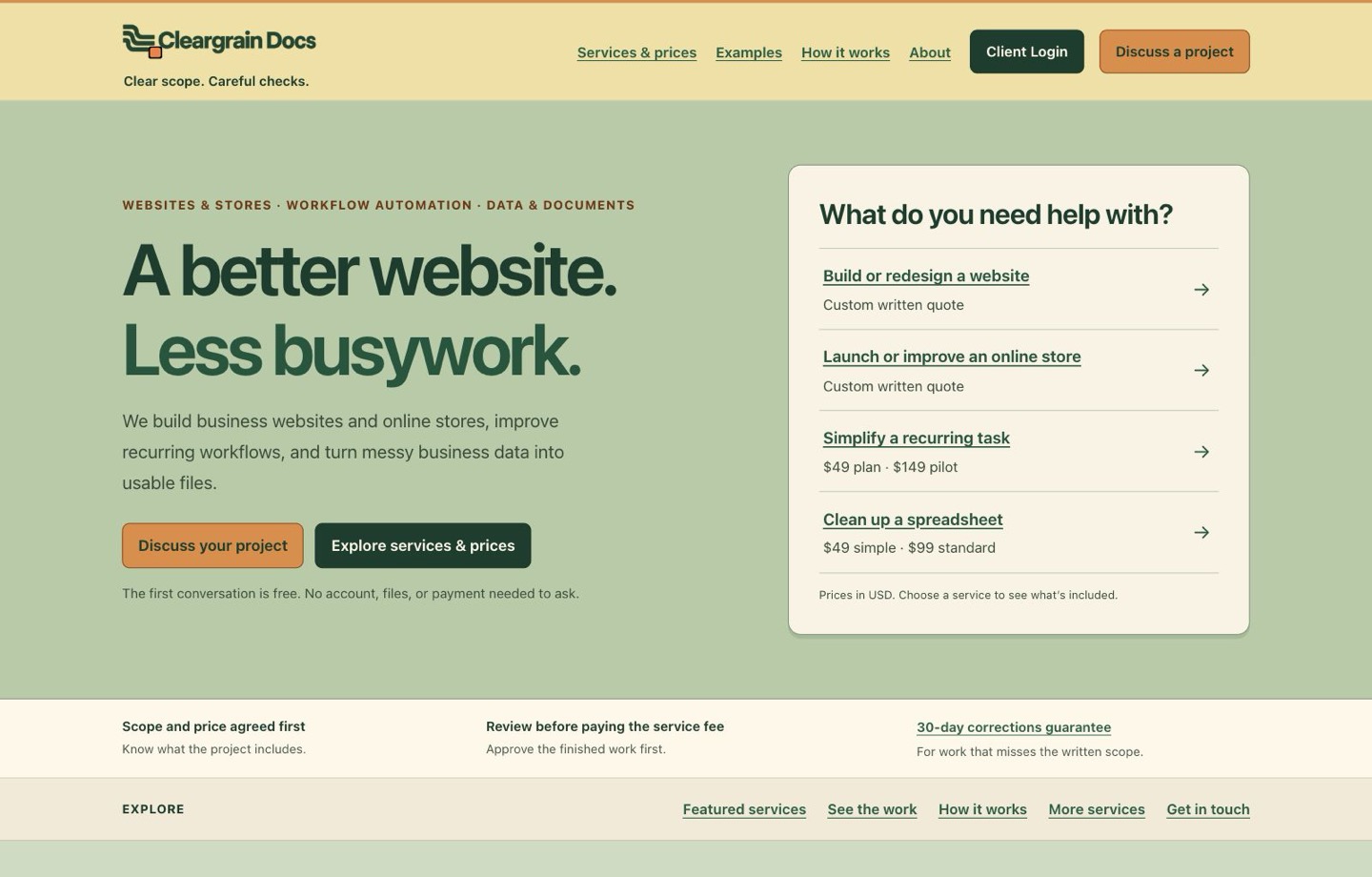
Cleargrain’s own website brings a range of business services into a clear path: compare the options, explore examples, and describe your project. No account is needed to get started.
The design brief
Help a visitor understand what Cleargrain does and choose a sensible starting point.
The business covers websites, online stores, workflow improvements, business data, and supporting documents. The site therefore needed a clear hierarchy: lead with the three main service groups, keep smaller fixed packages easy to compare, and preserve the important limits around pricing, proof, review, payment, and handover.
What the site demonstrates
A connected path from first question to an informed inquiry.
Choose by result
The homepage and service catalog group the work by what a customer needs to improve, while still exposing package prices and custom-quote boundaries.
Understand the offer
Each service page brings the useful situation, deliverables, scope basis, and next step together before the longer details.
Inspect the evidence
The example library separates original sources, finished files, checks, and limitations. It also identifies demonstrations that are not paid client projects.
Ask in context
Service-specific links carry the selected topic into the inquiry page. The visitor can review the relevant offer terms before sending anything.
Separate public and client work
Public service information remains open to everyone. Client Login leads to a distinct, sign-in-gated area for agreed private project activity.
Explore it yourself
Follow the same path a customer would.
Use the live pages to see how the site moves from a broad need to a specific service and an informed inquiry. You can explore this path without creating an account or sending the form.
- Choose a website or workflow service and compare its deliverables, scope, and next step.
- Open a service-specific inquiry and see the selected topic and relevant terms before entering anything.
- Browse the example library to inspect the sources, finished work, checks, and limitations behind each public-source project.
About this example
Website design you can explore.
This example shows our own site’s content, navigation, and inquiry journey. No traffic increase, conversion improvement, sales result, or return on investment is claimed. It does not demonstrate a product catalog, live store checkout, or e-commerce handover.
Your project receives its own written scope, price, acceptance checks, ownership terms, and launch plan.
Have a website project in mind?
Start with the result your customers need.
Describe the site you have now, what visitors should be able to understand or do, and any deadline. Start with a free fit discussion to explore whether a website review, redesign, or new build is the right next step.